AI lead generation tools help a B2B team find suitable accounts, identify people, decide whom to approach, respond to inbound interest, or prepare outreach. Choose the tool for the job that is failing in your process. More contacts will not fix slow responses to buyers already on your website. A polished AI message will not rescue an irrelevant account list.
In short: Define the missing output first: a sourced account, a verified contact, a reason to prioritize, a useful conversation, or an owned next action. Then compare the tool's required data, the output a person can inspect, its controls, and the work needed to run it. Trial plausible candidates on your own eligible records before committing.
Alore publishes this article and is one of the ten products compared. Its Atlas CoPilot is available to customers in beta. Alore's feature statements here draw on product screens and direct confirmation from its owner; the other product descriptions draw on the vendors' own pages. Product images are supplied by their vendors or, for Atlas, derived from an owner-supplied beta screen. They show interface concepts, not independent results. We have not independently tested all ten products or ranked their results. Prices, eligibility and feature access can change, so confirm current terms with each vendor.
What Counts as an AI Lead Generation Tool?
Lead generation is the work of finding and engaging potential buyers. In these tools, AI might research a company, fill a field from web evidence, score an account, summarize a signal, draft a message, or answer a website visitor. A rule that moves every new form fill to the CRM is useful automation, but it does not by itself make an AI lead generation tool.
The distinction matters because vendors use lead for different outputs. Ask what has actually changed by the end of the workflow.
What Kind of Lead Does the Tool Actually Produce?
An AI score is a suggestion to investigate. An accepted LinkedIn invitation, a delivered email, a chatbot exchange and a booked meeting are different events. Do not call all four qualified leads. The specific output and its quality should determine your trial.
How We Selected and Compared These Ten Tools
We included B2B products with a documented or owner-confirmed AI role in prospect research, data enrichment, account prioritization, inbound response, or outreach. The tools span different jobs on purpose. The order is Alore first, then other vendors alphabetically; it is not a ranking.
For each option, ask five questions: What input does it require? What job does AI perform? What output can a person inspect? What control is documented, and what control still needs a demonstration? Which bottleneck does it plausibly fit? The individual profiles also note access, pricing basis, setup work and the main condition to verify. Vendor descriptions establish what is offered, not performance on your accounts.
Ten AI Lead Generation Tools Compared by Job
This table gives the first pass. The profiles below explain when each choice earns a trial and what could make it fail. “Inspectable output” means a record, draft or conversation you can examine, not a promised business result.
Alore With Atlas CoPilot (Our Platform): Prospecting, Buyer Context, and Outreach
Alore brings data sourcing, LinkedIn prospecting, buyer-context work, prioritization, cold email outreach and LinkedIn outreach into its platform. Atlas CoPilot is the customer-beta AI layer: the owner has confirmed live fit scoring, drafts and email, LinkedIn and MCP functions. Alore also shows Warm Up, SOP Builder, Prompts and Post-Demo Intel modules. The supplied screens show fit scores and drafts beside prospect records; they do not establish that every module runs as one autonomous workflow or that a score predicts a sale.
First fit and output: A team that wants prospect selection and outreach work in one place. Review a small set of scored prospects, the reason for each score, the draft and the owner action. The owner-supplied interface shows fit status, prospect stage and draft availability; it does not prove that a score predicts a sale.

Control to verify: An owner-supplied inbox screen shows a Hold, nothing to send recommendation after an automated reply. In a beta demonstration, ask exactly who can approve a draft, pause a sequence, correct a score and suppress a refusal across channels. A displayed Hold recommendation does not establish every stop behavior.
Access and cost: Atlas is available in customer beta. A public Atlas feature page, self-serve access path and price were not supplied at this review date; contact Alore for current scope and terms.
Setup and limit: Confirm required data, mailbox/LinkedIn access, MCP permissions, review settings and who maintains the process. Owner confirmation and a product screen establish availability of named functions, not performance on your market.
6sense Sales Intelligence: Prioritize Accounts
6sense Sales Intelligence describes account intent, predictive insights, buyer research and recommended seller actions. It fits an account-based team whose main problem is allocating attention among known accounts, rather than simply finding more names.
First fit and output: Give sellers a representative account set. Ask them to explain each recommendation from visible signal, date and context, then identify a suitable person and next action. An account researching a topic is not proof that a named buyer has an active project.
Control to verify: Confirm whether a seller can inspect and correct the account recommendation before acting; no approval mode is established by the cited product page.
Access and cost: Obtain current licensing terms from 6sense pricing, including seats, credits and records relevant to the proposed package.
Setup and limit: Confirm market coverage, CRM connection and signal interpretation with your own accounts.
Apollo: Find Contacts and Manage Outreach
Apollo combines B2B contact data, prospecting and outreach in one workspace, with AI-assisted research and execution features. It is plausible when a team loses time exporting contacts between a database and a sequencing tool.
First fit and output: Test a defined ICP against known accounts. Inspect the role, current company, contact route and proposed reason to write before using a sequence. A large database does not establish useful coverage in your niche.
Control to verify: Ask Apollo to demonstrate draft review, send approval, reply routing and suppression in the plan you would buy. Those controls are trial requirements here, not independently verified features.
Access and cost: Apollo's plans include a free option and paid plans with pooled credits for data and AI-related actions. Confirm the credit use and rollover rules for your actions.
Setup and limit: Confirm CRM sync, source quality, sender permissions and the person who owns replies.
Clay: Research and Enrich Prospects
Claygent can research a specific account question and return structured fields. It is valuable when the field that predicts fit is absent from a standard company database, such as a supported integration or a publicly documented operating model.
First fit and output: Define one question, acceptable sources and an explicit unknown result. Check every answer and source link in a small trial; record the time spent fixing wrong or stale fields.
Control to verify: Confirm that a reviewer can see the source, mark a result unknown or wrong, and prevent an unverified field from starting outreach. The tool's research output alone is not an approval gate.
Access and cost: Clay pricing separates Data Credits for enrichment from Actions for workflow work; AI actions can have fixed or variable usage. Estimate both units on your sample rather than assuming one cost per row.
Setup and limit: Someone must design and maintain the table, research prompts, source rules and downstream review. A filled field is not automatically a verified fact.
Gumloop: Build Custom Lead Workflows
Gumloop's lead-generation agent use case describes connected workflows that research, enrich and route leads. It is a builder, so its value depends on your team's ability to define the process rather than on a fixed B2B sales dataset.
First fit and output: Start with one narrow flow: take an account, test a fit condition from a source, write the reason to a record and queue human review. Run duplicates, missing data and failed connections through it.
Control to verify: Because your team designs the flow, demonstrate a human approval step, an error state and a stop condition in the actual flow you would deploy. Do not assume the builder enforces them automatically.
Access and cost: Gumloop pricing uses plans, credits and an orchestration charge; connected services may add their own costs.
Setup and limit: Your operator owns workflow design, permissions, maintenance and error recovery.
HubSpot Prospecting Agent: Work From CRM Context
HubSpot Prospecting Agent works from CRM context to identify or research prospects and help prepare outreach. It is most relevant if your team already maintains its sales work in HubSpot.
First fit and output: Test one approved play on CRM records with both complete and missing context. Inspect why the agent suggests a person and the sources behind the draft.

Documented control: HubSpot describes optional rep review and editing before send, as well as a fully autonomous mode. Demonstrate the exact mode, pause behavior and opt-out path that your account would use.
Access and cost: HubSpot lists eligible Sales Hub editions and a charge per lead for which outreach is recommended on its Prospecting Agent page. Confirm current seat and credit terms for your edition before calculating a trial cost.
Setup and limit: An incomplete CRM record can yield a plausible but weak recommendation. Confirm data access, enrollment rules and reply ownership before scaling.
Qualified Piper: Respond to Website Buyers
Qualified Piper focuses on inbound website conversations and follow-up. It tackles a different failure from a prospect database: a relevant buyer reaches your site and cannot get a timely, useful answer or an owned handoff.
First fit and output: Test real visitor questions, including one the system should decline or pass to a person. Review the transcript, routing decision and whether a meeting meets your acceptance rule. More conversations alone are not more qualified opportunities.

Control to verify: Ask Qualified to demonstrate the agent's escalation, correction and stop paths using your own knowledge and routing rules. Agent handoff is listed under the Enterprise tier on Qualified's pricing page; do not assume every tier includes it.
Access and cost: Qualified lists Premier, Enterprise and Ultimate plans; full pricing requires a quote. Confirm which inbound, meeting and handoff functions are in the quoted tier.
Setup and limit: The team needs approved knowledge, routing rules, CRM integration and human coverage for exceptions.
Regie.ai: Run Outbound Campaigns
Regie.ai's outbound product describes ranked prospect lists, enrichment, source-backed message drafts and work across email, phone and LinkedIn. It fits a team that already knows its ICP and offer but spends too much time preparing and working its daily queue.
First fit and output: Examine why each contact entered the queue, then verify every personalized claim against its source.
Control to verify: Test approval, reply routing and suppression before allowing automated actions. The outbound page describes source-backed drafts, but that alone does not establish your desired approval or stop mode.
Access and cost: Regie.ai pricing lists Free, Pro, Team and Enterprise arrangements with different credit and feature scope; confirm the channels and agent functions in your tier.
Setup and limit: Faster execution can magnify a poor selection rule. Channel access and permitted sending remain your team's responsibility.
Salesforce Prospecting Agent: Prioritize CRM Accounts and Contacts
Salesforce Prospecting Agent uses Salesforce context to prioritize accounts and contacts and support prospecting work. Its likely value is strongest when that CRM is already the seller's operating record.
First fit and output: Demonstrate one account with conflicting or incomplete CRM fields. Ask what data the agent used, what it inferred and what it cannot know.
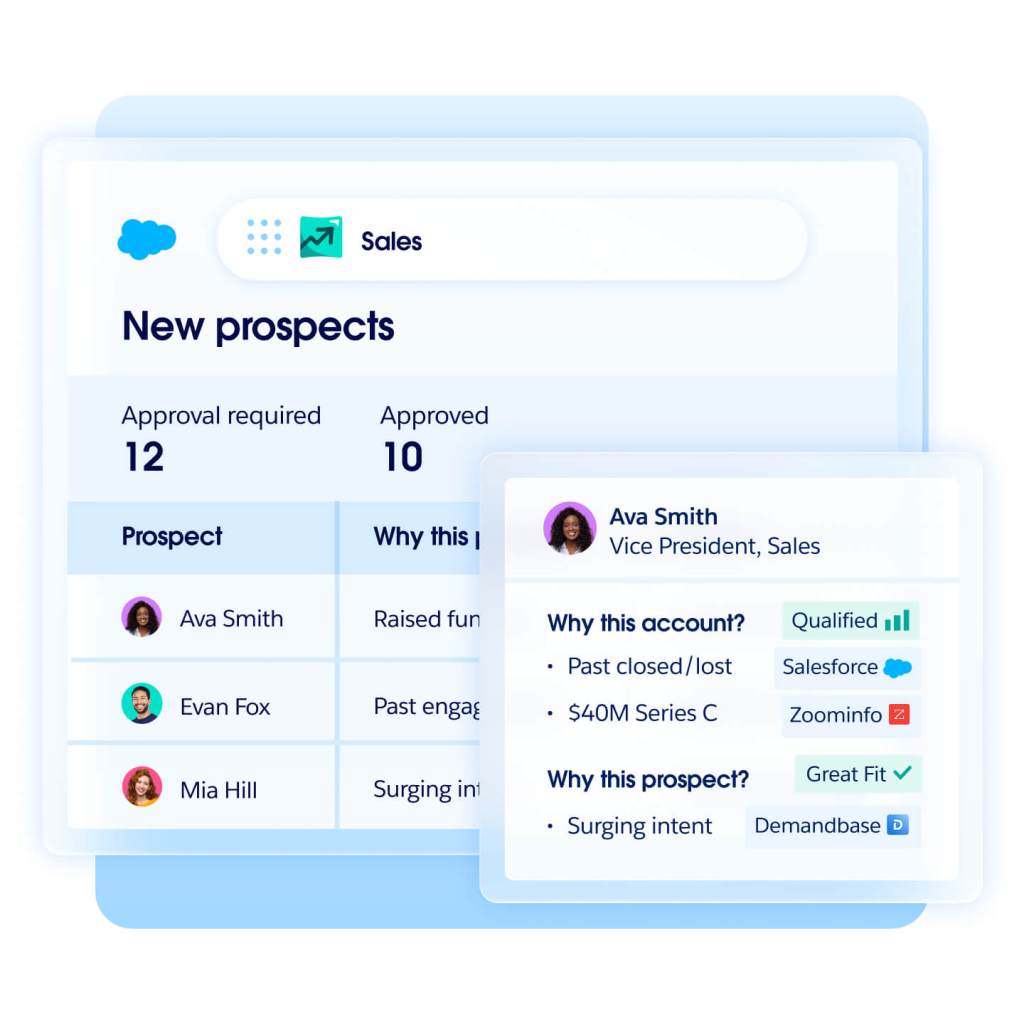
Control to verify: Have an administrator show the permission boundary, human takeover and stop behavior in your proposed setup. The general product page does not establish a universal approval mode.
Access and cost: Agentforce access and pricing depend on the edition, add-ons and usage arrangement; confirm the exact prospecting-agent entitlement.
Setup and limit: Permissions, data quality, implementation and administrator ownership determine whether its output is usable.
ZoomInfo Copilot: Find Buyer Context and Prioritize Outreach
ZoomInfo Copilot connects account/contact intelligence with research, signals and suggested seller work. It may suit a team pursuing named accounts that needs current context to choose who to approach and why.
First fit and output: Use accounts from your own territory. Check the source and date of a signal, the named person's role, and whether the proposed action is relevant. A priority label is not evidence of a buyer's consent or decision.
Control to verify: Ask a rep to demonstrate correction of a false priority, draft review and suppression in the quoted package. The cited product page does not establish these as universal controls.
Access and cost: Obtain a current quote covering data access and Copilot features; no universal price is asserted here.
Setup and limit: Verify your segment's coverage, integration and refresh timing.
Which Tool Fits the Bottleneck in Your Lead Generation Process?
Look at recent records before choosing a product. Where did useful work stop: account selection, contact verification, prioritization, inbound response, outreach preparation or handoff? The table routes that observation to a plausible tool class. Several products overlap, and the same company may need a process fix before another subscription.
Use Stop for a recorded refusal, opt-out or other prohibition, including when another platform presents the same person again. Use Hold for a fixable uncertainty: an outdated role, duplicate, missing source, inaccessible system or unreviewed claim. A person resolves the cause before any send. The AI prospecting guide goes deeper on building a reviewed shortlist; the cold email lead generation guide covers the outbound process after selection.
How to Test a Tool Before You Buy It
A useful trial answers a decision, not a demo question. Write the bottleneck and output in one sentence: “Among accounts matching these conditions, we need more sourced, usable contacts” or “Among qualified website inquiries, we need more answered and owned conversations.” These are different tests. Do not combine their output counts into one league table.
Define the Eligible Accounts and Useful Output
- Freeze eligibility before the run. Define ICP, exclusions, existing customers, suppression, required data and the observation period. Keep held/excluded records in a separate count.
- Define a pass. For a contact test, it may require current company, role, source and usable route. For inbound, it may require a correct answer, relevant buyer and an assigned next action. Set the rule before seeing vendor output.
- Choose comparable candidates. If two products perform the same job, use the same eligible records and cutoff. If one builds contacts and another handles inbound, judge each against its own job and do not compare their raw “lead” counts.
The starting record can be short: eligible inputs, required output, evidence required, human reviewer, decision date. An account excluded before assignment is not a failure of the tool. An eligible account that produces no usable output stays in the denominator.
Check Data Errors, Replies, and Human Handoff
Review the actual records, not a dashboard total. For each usable-looking result, record source and date, factual errors, duplicates, unsupported message claims and the time a human spends correcting it. A completed AI field may simply encode an inference. Let the reviewer mark pass, hold for correction or reject, with a reason.
Then test the paths that often disappear from vendor demos:
- A human replies: Who sees the answer, who stops the no-reply sequence, and when does an owner take over?
- A buyer refuses or opts out: Is the person suppressed across relevant tools and channels?
- An automated reply or unknown answer arrives: Does the system pause for a person instead of inventing the next message?
- A sync or data source fails: Does the record show an unresolved error and owner, or silently look complete?
For US commercial email, the FTC's CAN-SPAM guide explains sender obligations, including accurate header/subject information and honoring opt-outs. An AI vendor does not remove those obligations. Check provider and platform rules for the routes you use.
Compare Results, Setup Work, and Total Cost
Use the same denominator for comparable trials: eligible assigned records. Count passed outputs, rejected outputs, unresolved holds, human review minutes, integration failures and accepted next actions separately. For an outbound test, a delivered message is not a seen message; a reply is not automatically a qualified opportunity. For an inbound test, a chat is not automatically a sales-ready meeting.
Here is a fictional arithmetic illustration, not a vendor result or industry benchmark. Two contact-finding options each receive the same 20 eligible assigned accounts and the same review cutoff. Each is asked for at most one relevant contact per account. Each account receives one exclusive pass, Hold or reject status at the cutoff. A pass requires the prewritten current-company, relevant-role, source and route checks. An account with no usable output remains in its assigned denominator; a Hold remains unresolved.
Both sets of dispositions add to 20. A gives two more passed records; B uses less review time per pass. If reviewer capacity is the binding constraint and the records are equally useful, B may deserve another trial. If coverage is more valuable and the six Holds can be resolved efficiently, A may. Neither result proves a reply, opportunity or sale. Obtain the license, credit, integration and maintenance costs before a purchase decision; those costs are unknown in this illustration. Repeat with another suitable cohort before treating a small difference as a default policy.
What to Do With Your Shortlist
Pick two or three products that solve the bottleneck you observed. Ask each vendor to demonstrate the same representative records, the source behind the output, the human controls, the failure path, access prerequisites and total price basis. Choose a limited trial when those are clear. Hold the purchase if the data, owner or stop rules are missing. Reject a tool when its primary job does not match the problem.
If prospect fit, buyer context and outreach coordination are the work you need to examine, ask Alore about the Atlas customer beta and request the same evidence you would from every other vendor. The best AI lead generation tool is the one that produces more usable, accountable work for your specific job after you count the review and follow-through it adds.