
.svg)
.svg)
.svg)
To ask for an update politely, reply in the original thread, name the exact item you're waiting on, give the date or reason that makes the update useful now, and end with one question the other person can answer in a line. For example: "Do you still expect to send the signed contract by Friday? Our onboarding call is set for Monday." Send it once any date they promised has passed. With no promised date, two to three business days is a reasonable wait for internal work, and about a week suits most external reviews and decisions.
The four parts of a polite update request
A polite status update request does four jobs: it places the conversation, names the item, explains why you need the answer now, and asks one easy question. The reason and the question give the reader context and an easy way to answer, which helps the request read as polite. Extra apologies make the email longer and the ask harder to find.
| Part | What it does | Example line |
|---|---|---|
| Context | Places the request in one line | "Following up on the Q4 pricing deck from Tuesday's call." |
| Specific ask | Names the item you need | "Do you still expect to send it by Friday?" |
| Reason or date | Explains why the answer matters now | "I'm assembling the board packet on Monday and want your numbers in it." |
| Easy reply | Makes answering painless | "If the timing has moved, a new date works and I'll plan around it." |
Assembled, it reads like this (template):
Hi Dana,
Following up on the Q4 pricing deck from Tuesday's call. Do you still expect to send it by Friday? I'm assembling the board packet on Monday and want your numbers in it. If the timing has moved, a new date works and I'll plan around it.
Thanks,
Sam
A real update request from the Alore team
Trisha on our team sent this to a client after the campaign start date went quiet. Client names are removed.
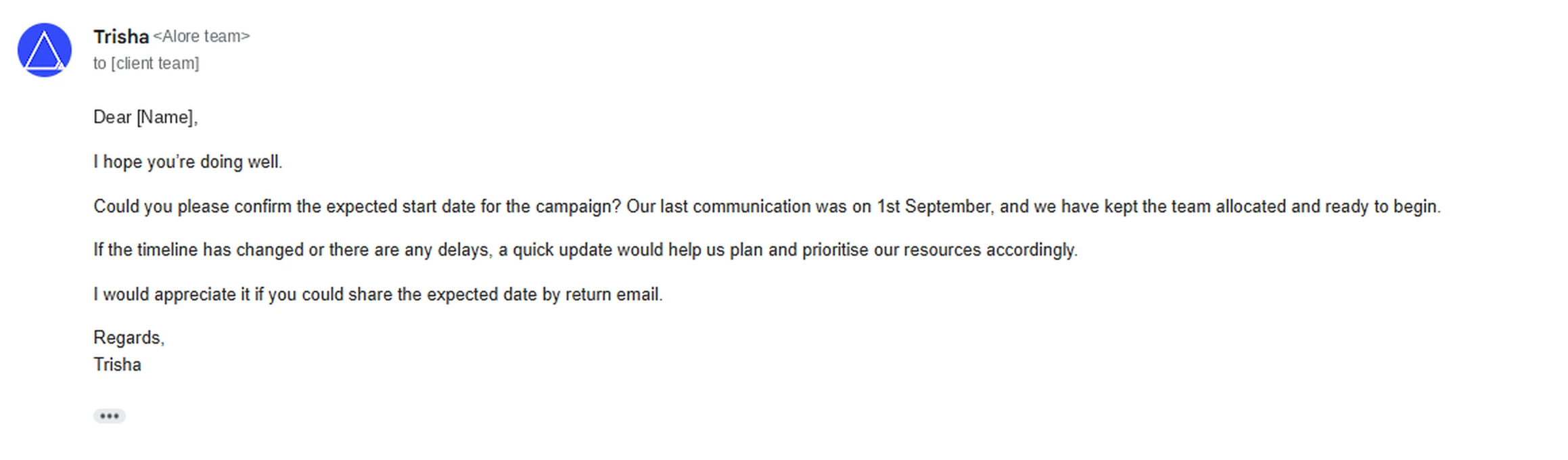
It has all four parts. The context is the last communication on 1st September, and the specific ask is the expected start date. The reason is that the team is allocated and waiting, and the easy reply is to share the date by return email. When chasing by email still didn't settle the date, we moved the conversation to a call, the first escalation step covered below.
A real case shows what happens when the parts are missing. On The Workplace Stack Exchange, a user who emailed clients "Please send a status update for this request. Thanks" after at least 48 hours was told by their manager and company director that the wording seemed "kind of rude, aggressive." The highest-voted answer suggested a question with a reason attached: "We are currently blocked by this issue, do you think the bugfix will be deployed this week?" The question has been viewed about 581,000 times (as of October 5, 2026).
One thread can't predict every recipient, and the asker never reported how the rewrite landed. It is still a useful model: the suggested rewrite keeps the request and adds a question and a reason. Those are the two parts most worth checking in your own draft.
How long to wait before asking for an update
The most reliable timing rule is the one the other person set. If they said "by Friday," ask on Monday. When no date was promised, use the situation guide below. These intervals are our practical guidance, and published advice varies: Indeed suggests three to five business days for work projects, while Grammarly suggests a reminder after "a week or two without any acknowledgment."
| Situation | When to send the first update request | What to include |
|---|---|---|
| They gave you a date | The next business day after it passes | The date they gave |
| Colleague, no date set | 2 to 3 business days; sooner if your work is blocked | What depends on it |
| Manager approval | 2 to 3 business days, or at least a day before your own deadline | The decision date you need |
| Client feedback or approval | About a week for a full review; 2 to 3 business days for a quick check-in (Indeed's range for client requests) | The milestone their feedback affects |
| Vendor deliverable | The day after the due date; a day or two before it if the deadline is critical | The PO or agreement and the due date |
| Unpaid invoice | 1 to 3 business days after the due date | Invoice number, amount, due date, and a copy |
| Job application | 1 to 2 weeks after applying (Indeed's range) | The role, the date you applied |
| After an interview | No earlier than a week after their stated decision date (Ask a Manager's rule); with no date given, 3 to 5 business days (Indeed) to two weeks (Ask a Manager) | The interview date and the role |
| Recruiter who went quiet | About one week after your last exchange | Where you are in the process |
Research on reply behavior supports a short wait with regular contacts. A study of 16 billion emails from more than 2 million Yahoo Mail users by researchers at USC and Yahoo Labs (Kooti et al., 2015) found that more than 90% of replies happened within a day of receiving the message, and half came within 47 minutes. The study focused on pairs of people who wrote to each other regularly, so it describes established contacts. The data comes from opted-in Yahoo Mail users and was published in 2015, so treat it as a rough baseline for workplace email. After two or three business days, a regular contact's silence is already well outside the typical reply window, and a short nudge is reasonable.
The same study found that as daily email volume rises, people reply to a smaller share of what they receive: about 25% of a day's emails at low load, under 5% at about 100 emails a day (as stated in the paper, counting all received mail, including messages that need no reply). The decline held when the researchers counted only mail from contacts. That is a good reason to read silence as a busy inbox before you read it as a no.
Polite phrasing that keeps the request friendly
An update request is more likely to sound pushy when it lacks information (no item, no reason) or leans on a stock phrase people associate with irritation. In Adobe's 2018 Consumer Email Survey of more than 1,000 white-collar workers, "Not sure if you saw my last email" ranked as the most annoying email phrase, followed by "Per my last email" and "Per our conversation" (as reported by CNBC; Adobe's original deck is no longer online).
The swaps below keep the same intent and add the missing detail.
| Common phrase | Better phrasing | Why it reads better |
|---|---|---|
| "Just checking in." | "Checking where the Q3 forecast stands. Do you still expect it Thursday?" | Names the item and the date |
| "Not sure if you saw my last email…" | "Resending the request below so it's easy to find." | Assumes good faith |
| "Per my last email" | "Here's the detail from my March 4 note, so it's all in one place:" | Repeats the information without blame |
| "Any updates?" (on its own) | "Any update on the vendor contract? Legal needs it Thursday." | Adds the item and the reason |
| "ASAP" | "by 3 p.m. Wednesday" | Gives a time the reader can plan around |
| "Please send a status update." | "Could you let me know where ticket #4182 stands? We're blocked until it ships." | Asks a question and gives the reason; the original issues an instruction |
| "Sorry to bother you again…" | "Thanks for your help with this." | Ends on gratitude |
| "This is my third email about this." | "Following up on the request below." | Leaves out the scorekeeping |
Repeating information is where "per my last email" usually creeps in. In a Workplace Stack Exchange thread on how to repeat yourself without being condescending, one answer pointed out that openers like "Again" or "As we discussed" put "the onus of the misunderstanding on the listener," and suggested owning it with a line such as "I didn't explain that very well." In an update request, that can be as simple as restating the ask in one sentence with the date.
Gratitude is worth keeping. Boomerang's 2017 analysis of closings in more than 350,000 email threads found that messages ending in "thanks in advance" got a reply 65.7% of the time and "thanks" 63.0%, against a 47.5% baseline (Boomerang). The emails came from online-community mailing lists where people were often asking for help, and the study measured a correlation, so treat it as a reason to keep your thanks, with no promise of the same rates in workplace email.
Professional ways to say "I'd like an update," from most casual to most formal:
- "What's the latest on [item]?"
- "Is [item] still on track for [date]?"
- "Do you have an update on [item]?"
- "When do you expect to have a decision on [item]?"
- "Is there anything you need from me to move [item] forward?"
- "Could you please provide an update on the status of [request]? We need it to [reason]."
If your formal requests open with "I am reaching out to follow up," our guide to what to say instead of "I'm reaching out" has shorter openers by situation.
Subject lines for update requests
Reply in the original thread whenever you can, because the history travels with your question and the recipient doesn't have to search for context. Write a new subject line only when you're starting a fresh email or the thread is long enough to bury the request. A good update subject names the item plus a date, number, or decision, so it makes sense in the inbox preview.
Subject line templates:
- Status check: [Project] launch date
- Still on track for [date]? [Deliverable]
- Approval needed by [date]: [item]
- Invoice [#] for $[amount], due [date]
- [PO #] delivery: still on track for [date]?
- Application status: [Job title], [Your name]
- Following up: [Job title] interview on [date]
- Feedback on [deliverable] by [date]?
Leave out subject lines that say only "Following up," "Checking in," or "Quick question," since none of them tells the reader what you need. Save "Urgent" for genuine emergencies, so it still works when you need it.
Email templates for asking for an update
The templates below are written to be sent with only the bracketed parts changed. Each body runs under 75 words. In the Kooti study, longer received emails were associated with slower replies (a correlation, which doesn't prove that length caused the delay), so short is the safer default.
Template 1: Job application status
Subject: Application status: [Job title], [Your name]
Hi [Name],
I applied for the [Job title] role on [date] and wanted to ask where the search stands. I'm still interested, especially in [one specific thing about the role or team].
Is there a timeline for next steps you can share? If someone else is managing the search, I'd be grateful if you could point me to them.
Thank you,
[Your name]
[Phone] | [LinkedIn URL]
Send it to a named recruiter or hiring manager where you can find one; a general careers inbox may not reach the person making the decision.
The template asks for a timeline on purpose. The workplace advice column Ask a Manager told a job seeker who had already asked once for "an update" that repeating that request "can feel like nagging if you do it more than once," and suggested a more specific question: "Would it be possible for you to give me a sense of your timeline for next steps?" A timeline question gives the hiring manager something concrete to answer even when no decision has been made.
Template 2: After an interview
Subject: Following up: [Job title] interview on [date]
Hi [Name],
Thank you again for talking with me on [date] about the [Job title] role. You mentioned the team hoped to decide by [date], so I wanted to ask whether there's any news on next steps.
Our conversation about [specific topic] made me more excited about the role. If it would help, I'm glad to send [work sample or references].
Best regards,
[Your name]
Keep this separate from your thank-you note, which goes out on the day of the interview.
On timing, Ask a Manager advises asking at the end of every interview when the team expects to be in touch, then to "take the timeline they give you, add a week to it," because hiring "nearly always takes longer than anyone expects it will, including employers." With no timeline given, the column's default is two weeks after the interview. Its suggested message follows the same shape as the template: "I know you were hoping to be moving forward around now, and I wondered if you had an updated timeline you could share."
The same column published a script in April 2020 for people who had accepted an offer and weren't sure their start date would hold: "I wanted to touch base about the position I'm slated to start on (date). Should we still be on track for that, or is there any reason to think plans may need to change?" It names the date, asks a yes-or-no question, and leaves room for bad news, which can make an honest answer easier to give.
Template 3: Recruiter who went quiet
Subject: Next steps for the [Company] [Job title] role
Hi [Name],
Thanks for setting up my conversation with [hiring manager] on [date]. Do you have an update on where the process stands?
[Only if true: I'm in late-stage interviews with another company and would like to keep [Company] in the picture.] Even a rough timeline would help me plan.
Thanks,
[Your name]
With no competing process, use one line on what you'd bring to the role in place of the bracketed line.
Template 4: Client feedback or approval
Subject: Feedback on [deliverable] by [date]?
Hi [Name],
Following up on the [deliverable] I sent on [date]. Have you had a chance to review it?
To hold the [launch] date of [date], we'd need your feedback by [date]. If a full review is hard to fit in this week, answers to two questions would keep us moving: [question 1] and [question 2].
Happy to walk through it on a 15-minute call if that's faster.
Best,
[Your name]
Narrowing a large review to two questions gives a busy client something they can answer from their phone.
Template 5: Vendor or supplier deliverable
Subject: [PO #] delivery: still on track for [date]?
Hi [Name],
Checking on [order or deliverable], which is due on [date] under [PO # or agreement]. Is it still on track?
Our [installation or launch] is scheduled for [date], so if anything has moved, please send a revised date and I'll adjust on our side.
Thanks,
[Your name]
Template 6: Unpaid invoice
Subject: Invoice [#] for $[amount], due [date]
Hi [Name],
I'm following up on invoice [#] for $[amount], which was due on [date]. I've attached a copy in case the original went astray.
Could you confirm whether it's scheduled for payment? If it needs a PO number or should go to someone in accounts payable, let me know and I'll send it there.
Payment details: [bank transfer details or payment link]
Thank you,
[Your name]
Attaching the invoice and offering to reroute it removes two easy reasons for a payment to stall on the client's side: a missing document and the wrong contact.
Template 7: Internal project with a colleague
Subject: Re: [Project] (reply in the existing thread)
Hi [Name],
Where are we on [specific piece], which we'd planned for [date]? I'm putting together [next step] on [day] and want to build on your work.
If something's blocking it, tell me what and I'll help clear it.
Thanks,
[Your name]
Template 8: Manager approval
Subject: Approval needed by [date]: [item]
Hi [Name],
Could you approve [item] by [date]? [Vendor or team] needs our answer by then to hold [the price or slot].
The short version: [one-line summary, for example, "$4,800 for 12 months, within the Q4 budget"]. Full details are in my note from [date]. If you'd like to talk it through, I can grab 10 minutes on your calendar.
Thanks,
[Your name]
Asking for a yes or no by a date is easier for a manager to act on than an open request for an update.
Template 9: Slack or Teams message
Chat messages need the same parts in fewer words:
- "Hi Priya, any update on the pricing page copy? I'm handing it to design at 2 p.m."
- "Quick one: is the API fix still going out today? Support wants to tell the customer."
- "Whenever you have the final headcount, could you drop it here? I need it before tomorrow's 10 a.m. planning call."
Post in the thread where the work was discussed, so the context sits right above your question.
Second and third follow-ups when there's still no reply
Each follow-up should change something: a smaller ask, new information, a different person, or a clear default. Resending the same email with "bumping this" adds pressure and no new reason to reply.
| Follow-up | When to send it | What changes |
|---|---|---|
| First | Per the timing guide above | Context, specific ask, reason |
| Second | About a week after the first (2 business days if your work is blocked); for job searches, usually skip | Shrink the ask to one yes/no or one date; offer another contact |
| Third | About a week after the second | State the default you'll act on and a date; offer to reconnect later |
| After that | If the third gets no reply | Switch channel, escalate, or close the topic |
Second follow-up (template)
Hi [Name],
Bringing this back up in case it got buried. To make it quick, here's the one thing I need: [single yes/no or date question].
If [other person] handles this now, I'm happy to ask them.
Thanks,
[Your name]
Third follow-up (template)
Hi [Name],
I haven't been able to confirm [item], so I'll plan on [default, for example, "keeping the current vendor for Q1"] unless I hear otherwise by [date].
If the timing is wrong on your side, reply "later" and I'll check back in [month].
Best,
[Your name]
The third email works only when the default is real and you're prepared to act on it. A stated default gives the other person an easy way to respond: a one-word reply, a correction, or silence that you can act on.
For job applications and interviews, one follow-up is usually enough. Ask a Manager's advice is that if an employer doesn't answer a polite check-in, "don't keep following up. At that point, their silence is their answer." Put your energy into other applications; a later reply is still welcome if it comes. For sales prospects who go quiet, see our guide to following up after no response.
When to escalate an unanswered update request
Escalate when the delay now threatens a deadline, a cost, or a commitment to a customer, and at least two clear written requests haven't produced an answer. Escalating is a request for help with priorities, so present it with facts and without blame.
Work through these steps in order:
- Change the channel. A two-minute call, a chat message, or a question at the end of a shared meeting often gets the answer an inbox didn't.
- Give a heads-up. Tell the person what you'll do next: "If I can't get this by Wednesday, I'll ask Maria to help us prioritize it." This gives them a final chance and keeps the escalation from being a surprise.
- Escalate with facts. Write to their manager, or ask your own manager to, with the dates of your requests and the consequence of further delay.
Escalation email (template):
Subject: Help unblocking [item] before [date]
Hi [Manager's name],
[Name] and I have been working on [item], and I haven't been able to confirm [specific need] since my request on [date], with follow-ups on [date] and [date]. I know [Name] has a lot on their plate right now.
Without it, [consequence, for example, "the March 3 launch moves a week"]. Could you help me find out who can confirm [specific need] by [date]?
I've copied [Name] so we're all working from the same information.
Thanks,
[Your name]
Copy the original person openly. A hidden escalation that they discover later can cost more trust than the delay did. With clients, escalate inside your own company first (your manager or account lead decides whether to approach the client's leadership). With unpaid invoices, the next step after two follow-ups is usually the client's accounts payable contact, followed by whatever late-payment terms your contract sets.
"Any update" or "any updates"?
Both are widely used and understood. After "any" in a question, Cambridge's grammar rule makes the plural the standard form. Cambridge Dictionary lists "update" as a countable noun ("I'll need regular updates on your progress"), and Cambridge's grammar guide says that in questions "any" goes with plural or uncountable nouns. That makes "Are there any updates?" and "Do you have any updates?" the textbook forms.
When you mean one piece of news about one item, "Is there an update on the contract?" is the cleanest singular version. "Is there any update on…?" treats update as uncountable; readers will understand it, though it's less standard by Cambridge's rule.
| Phrase | Correct? | Best use |
|---|---|---|
| "Are there any updates on [item]?" | Yes | General request, any channel |
| "Do you have any updates on [item]?" | Yes | Slightly softer; email or chat |
| "Is there an update on [item]?" | Yes | One item, one piece of news |
| "Is there any update on [item]?" | Understood; less standard | Swap in "an update" or "any updates" |
| "Any update on [item]?" / "Any updates on [item]?" | Fine in informal writing | Chat or quick email; always name the item |
| "Is there any news?" / "Any news?" | Yes; "news" is uncountable, so use "is," never "are" (Cambridge) | Casual, or after an interview |
Three phrases people search often can be improved the same way. "Any update on this matter?" becomes "Is there an update on [the specific matter]?" "Is there any update regarding the email below?" becomes "Do you have an update on the request below?" "Please update us on the status of the below request" reads more naturally as "Could you update us on the status of the request below?" Naming the matter or request does more for the tone than the grammar choice.
Check these five things before you send
A polite update request is a short, specific question with a reason, sent at a sensible time. Before you hit send, check:
- It's in the original thread, or the subject line names the item.
- It names the exact item and the date or reason that makes the answer useful now.
- It asks one question that can be answered in a sentence.
- The timing fits the guide above: the promised date or the interval for your situation has passed, or a critical deadline justifies checking earlier.
- You'd be comfortable if the recipient's manager read it.
If a request still goes unanswered, change something with each follow-up, and escalate only with facts and a heads-up.
For deadline, payment, and meeting reminders, see our guide to writing a polite reminder email. If your update requests go to prospects, the sequence matters as much as the wording: our guide to sales follow-up emails covers cadence and templates, and Alore's Drip Campaigner runs personalized follow-up sequences with follow-up reminders, so quiet prospects don't slip through.