LinkedIn prospecting means finding buyers who fit your offer, learning why contact might be timely, and starting a useful conversation. Before reaching out, decide which account and person matter, what you actually know, and what you want to learn.
In short: Start with a narrow account list and buyer role. Verify a relevant, public signal without treating it as proof of a private problem. Choose a permitted contact route, send one clear reason to talk, and track whether the right people reply and take a next step. Use Sales Navigator if it helps maintain the list; it is not the starting requirement.
What LinkedIn prospecting is—and what counts as progress
Searching titles and sending the same note to everyone creates a list of attempted contacts. Prospecting begins with a tighter question: which buyer problem can you genuinely help solve? An invitation acceptance or polite “thanks” marks access, not a sales conversation.
Choose target accounts and the buyer jobs you can help with
Define a small, explicit account segment before searching people. For example, “US B2B service firms with 100–500 employees that recently opened their first RevOps role” is a testable list. “Anyone in sales” is not. A hiring signal does not prove a company has a handoff problem or is ready to buy.
Write down three criteria:
Start with accounts because one company can have several plausible contacts. A simple account map can separate the person who owns the problem, a user who feels it, and a potential sponsor. Do not send all three the same pitch on the same day. First decide whom you need to learn from.
Find the right people and verify a reason to contact them
LinkedIn's ordinary search can help you inspect companies and roles. Sales Navigator adds saved leads and accounts, refined searches, and alerts; LinkedIn says saved leads can surface job changes and posts, while saved searches can notify you when new leads or accounts match your criteria. These are useful for maintaining a deliberate list, but you can test a small segment without buying a plan. LinkedIn: saved leads · LinkedIn: saved searches
For a first pass, start with a company that fits your segment, inspect its LinkedIn company and people information for a plausible VP of Sales or RevOps lead, then check the dated opening on the company's own jobs page. Save that source link and date in the record. A title or profile is a clue about responsibility, not proof of who owns the decision.
For each possible person, record only what changes the decision:
- Role and scope: Do they own the workflow your offer affects, or is that only a title guess?
- Account fit: Does the company meet the segment criteria?
- Observed signal: A job post, public company announcement, or a post the person actually made. Save the date and link.
- Working hypothesis: A possible consequence of the signal, clearly marked as unverified.
- Reason to contact: A question, insight, or resource tied to the observed situation.
- Next action and owner: Who will contact them, by which route, and when to revisit the record?
Do not turn “hiring RevOps” into “your lead handoffs are broken.” Hiring is observable; a handoff problem is an inference. If you cannot write the difference in your notes, the message is likely to overstate what you know.
A worked prospect record
Consider a hypothetical US B2B service firm, Alder, whose public jobs page lists its first RevOps analyst. Your team sells a sales-handoff audit. The record could look like this:
In real work, record the source link and date, and discard the angle if the event is stale or irrelevant. The value is the distinction between what you saw and what you guessed.
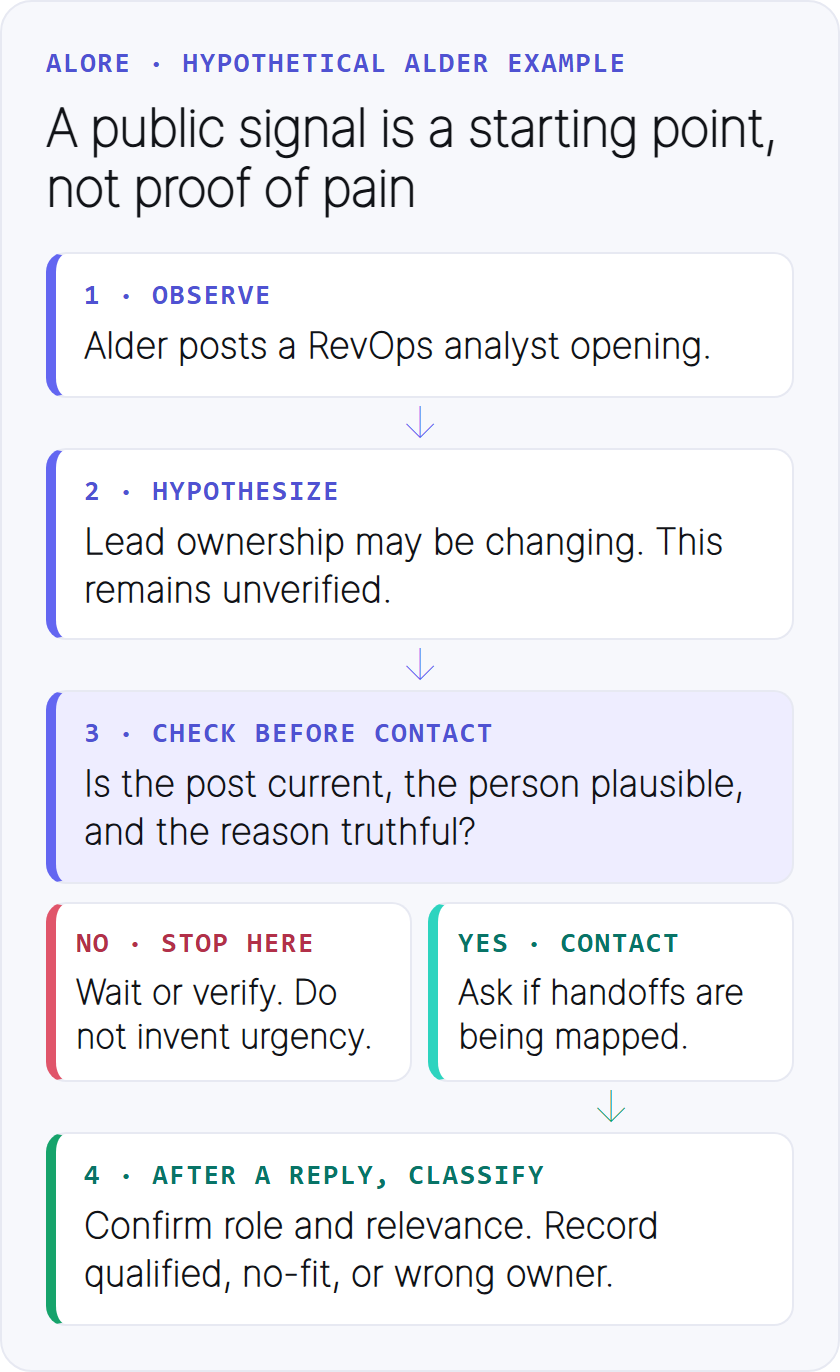
In this hypothetical example, a job post is observable; a handoff problem is not.
Suppose the VP is unfamiliar to the seller, the job post is current, and an InMail route is available. Use that route for the example below. A visible Connect control alone does not make a cold invitation the recommended choice. If there is no suitable message route, follow relevant updates or wait rather than manufacturing a “why now.”
Decide whether to connect, message, follow, or wait
LinkedIn recommends invitations to people you know and trust; it suggests InMail or Groups for people you have not met. That is a platform recommendation, not a blanket ban on unfamiliar-person invitations. First use a genuine existing relationship or an agreed introduction. For a stranger, check whether an appropriate InMail or other message option is available; if relevance or access is weak, follow, participate where useful, or wait. LinkedIn invitation guidance · Alternatives to invitations
LinkedIn says normal messaging access depends on connection status and the recipient's settings. It also describes invitation limits and restrictions for excessive, ignored, or spam-marked requests and prohibited tools; its guidance gives no universal “safe” weekly invitation number. Check your account's actual notices. LinkedIn connection routes · Invitation restrictions
Turn a public signal into a first message and useful follow-up
Your message has one job: make the reason for contact understandable and easy to answer. Use one observed detail, one relevant possibility, and one small request. A signal is context; it is not license to claim you know the person's private priorities.
For the hypothetical Alder record above, the seller does not know the VP but has an available InMail route. A first message could be:
I noticed Alder's RevOps opening. Is your team mapping lead handoffs as the role comes in? If so, I can share our one-page ownership checklist.
Use a similar message only if the job post is current and the promised checklist exists. If the person says the area is not theirs, ask who owns it only if that would be welcome; otherwise close the loop.
What happens after the message? These are fictional branches, not Alder results:
- No fit: “We've already mapped this; no help needed” is a substantive reply. Record no-fit and stop.
- Resource requested: “We are assigning ownership; please send the checklist” is a substantive reply. Record qualification pending, send the promised checklist promptly, and ask one low-friction question: “Are you leading this review, or is someone else?” If the VP confirms responsibility and an active handoff review, update the outcome to one qualified conversation. Suggest reviewing the checklist together, and record an agreed next step only if they accept.
- Wrong owner: If the VP names another owner, record a referral. Verify that person's remit before approaching them; a name alone is not permission to continue the same pitch.
A follow-up should add a new reason to respond, not simply ask whether the first message was seen. One possible second touch is:
Another decision in a handoff map is who closes the loop when a lead is rejected. If your team is working on that, I can send the checklist here. If the timing is off, no need to reply.
That second message changes the substance from general ownership to rejected-lead follow-through. If your first InMail gets no reply, check that the post and offer are still relevant before sending a follow-up with a genuinely new point. If that receives no answer, pause until a new signal provides a reason to revisit.
If the person objects or asks you to stop, stop. If they identify another owner, verify that person's remit before approaching them; do not assume a referral is an invitation. If they confirm an active project, agree on the specific next step. Do not send a rigid sequence to every prospect. For a full email sequence, see the separate cold-email follow-up guide.
Measure qualified conversations and diagnose the weak step
Use a shared lead tracker with separate fields for account and person fit, contact route and dates, connection and message events, response outcome (no reply, substantive reply with qualification pending, no-fit, qualified conversation, or wrong-owner referral), and next action, owner, and date. A stop request is a separate disposition that prevents further contact. A person can accept a connection without replying; those events must not overwrite one another.
A substantive reply is more than an acknowledgment. A qualified conversation is a substantive exchange with a person whose account and role fit the offer and who confirms the issue is relevant. Record a clear no-fit reply separately. An agreed next step is a specific action both sides accept, such as sending the checklist and reviewing it with the named owner.
Review a cohort with denominators that match the decision you are trying to improve:
Keep invitation, direct-message, InMail and email cohorts separate. Their access and audiences differ, so one blended “response rate” can hide the actual failure. Attribute a person to the route of their first substantive message; count a preceding invitation in the separate access measure.
Define a weekly cohort by its first message date and compare groups only after the same observation window. Count each contacted person and each qualified conversation once per cohort; record later touches as events.
If a route reports verified delivery, keep that as a separate diagnostic rather than changing the sent-person denominator.
In Alder's fictional qualified branch, the tracker records a fitting account and confirmed VP role, InMail date, one substantive reply, one qualified conversation, and a checklist review only if agreed. In the no-fit branch, it records one substantive reply, zero qualified conversations, and a stop disposition. These ratios diagnose a step; they are not promised benchmarks. With a small sample, inspect the actual exchanges before declaring a copy variant a winner.
Respect LinkedIn invitation and automation rules
Use saved searches and alerts as research aids, then have a person check whether a new job, post, or account event genuinely changes the outreach reason. An alert is a prompt to investigate, not an automatic send trigger. Do not use tools that copy data or automate LinkedIn activity in violation of its invitation restrictions guidance. Review the account record before each new touch and stop when the recipient asks.
Run the workflow each week: a decision checklist
At the start of each week, choose one account segment and one buyer job. Review a manageable set of companies, verify the current people and a real signal, and write down what remains uncertain. Choose the contact route only after that. Before each message, ask: “Would this person understand why I chose them, and can they answer my request without doing homework?”
At the end of the week, review qualified conversations and next steps, not just invitations and profile views. Suppose the fictional Alder segment produces replies mainly from people who do not own handoffs: keep the observed signal and message constant for the next small cohort, but change the role filter and record whether role fit improves. If the right people reply but decline the checklist, inspect the offer and proposed next step. These observations suggest a decision to test; a small cohort does not prove cause. Keep the record current so another rep does not repeat an approach or continue after a stop request.
LinkedIn is most useful as a source of context and contact choices. The outcome is a conversation with a person who has a reason to engage, not a bigger list of names.