
.svg)
.svg)
.svg)
The short version: when people ask about "types of email," they are usually asking one of three different questions. There are types by purpose (what the message is for: transactional, marketing, newsletter, cold outreach, internal), types by account (a free personal address versus a business address on your own domain), and types by address structure (an individual mailbox, a role address like info@, a disposable one, or a catch-all domain setting). Most guides answer only one of these and leave you more confused about the other two. This one separates all three, so you can tell which kind you actually need.
That is also why you see sources claim there are 4 types, 7 types, or 20 types of email. They are counting different things. Once you know which of the three senses you mean, the number stops mattering and the right choice gets a lot clearer.
The Three Things People Mean by "Types of Email"
"Types of email" is one phrase covering three separate ideas, and mixing them up is the reason most answers feel incomplete.
- By purpose: what the email is trying to do. A receipt, a newsletter, a sales pitch, and a cold outreach message are all different types in that first reading.
- By account: who owns and runs the address. A free @gmail.com address is a personal account; sarah@yourcompany.com on your own domain is a business account.
- By address structure: how the address itself is built and used. An individual mailbox, a shared role address, a catch-all, and a throwaway address behave differently and get treated differently by mail systems.
A marketer asking about "types of email" almost always means purpose. Someone setting up a company means account. A developer or a deliverability specialist usually means address structure. The rest of this guide takes each in turn, then shows how to pick.

Types of Email by Purpose (What You're Sending)
Sorted by what the message is for, most business email sorts into six common families. These describe a message's primary purpose, so one email can touch more than one of them: a password reset is transactional and also a notification, and a promotional newsletter is both marketing and a newsletter. The line that matters most here is between transactional and everything promotional, because the law and the mail providers treat them differently.
| Type | What it is | Triggered by | Example |
|---|---|---|---|
| Transactional | A message a user's action requires | An event (purchase, signup, reset) | Receipt, password reset, shipping update |
| Marketing / promotional | A message that promotes something to a list | Your campaign schedule | Sale announcement, product launch |
| Newsletter | Regular editorial sent to subscribers | A publishing cadence | Weekly roundup, company update |
| Cold outreach | An unsolicited message to someone who has not opted in | Your outbound sequence | Sales prospecting email, partnership pitch |
| Internal / operational | Email between people inside one organization | Day-to-day work | Team updates, approvals, notices |
| Notification / alert | A system message about account or security activity | A system condition | New login alert, usage warning |
Marketing is the family most people mean when they ask for a long list of email "types," because it splits further into campaign types:
- Welcome: the first message after someone signs up.
- Promotional: a sale, discount, or limited offer.
- Cart abandonment: a reminder when someone leaves items unbought.
- Re-engagement: a nudge to subscribers who have gone quiet.
- Drip / nurture: an automated sequence that follows a signup or action.
- Announcement: a product launch, update, or piece of company news.
These are all one family (marketing) sorted more finely, which is where lists of "12 types" or "20 types" come from.
Within purpose, transactional versus marketing is the line that matters most. A transactional email is one the recipient's own action made necessary: they bought something, so they get a receipt. A marketing email is one you chose to send to promote something. This is not a stylistic difference. Under the US CAN-SPAM Act, messages whose primary purpose is commercial carry specific requirements (a clear opt-out, a valid physical address, honest headers), while purely transactional messages are treated differently. Blurring the two, by slipping a promotion into a receipt, can move an email into the commercial category and the rules that come with it.
Cold outreach is its own category, and usually the hardest to get right. A cold email goes to someone who never asked to hear from you, which separates it from marketing email sent to an opted-in list. It carries the heaviest deliverability burden here, because mailbox providers watch unsolicited sending closely, and its compliance rules depend on where the recipient is and who they are. In the EU and UK, for instance, the requirements differ for a company mailbox, a sole trader, and a private individual, and data-protection law still applies either way, so a blanket "B2B cold email is always fine" is not safe to assume. If cold outreach is the type you care about, Alore's guide to cold email deliverability covers how to keep those messages out of spam.
Types of Email by Account (Personal vs Business)
Sorted by who runs the address, there are two accounts: personal and business. This is the "two types of email" most people have in mind when they compare personal and business email. The real difference is who controls the mailbox and domain, which usually tracks whether you use a free shared service or pay to run your own.
A personal email account uses a free, shared provider domain: @gmail.com, @outlook.com, @yahoo.com. You create it in minutes, it costs nothing, and the provider owns the domain. It is the right tool for individual, non-commercial use.
A business email account uses a domain you control, such as sarah@yourcompany.com, usually through a paid service like Google Workspace or Microsoft 365. As of October 2026, Google Workspace Business Starter runs $7 per user per month on an annual plan, or $8.40 month-to-month (Google Workspace pricing). In return you run it: you decide who has an address, you keep the mailboxes if an employee leaves, and you own the domain's sending reputation and authentication.
The differences that actually affect your work:
| Factor | Personal account | Business account |
|---|---|---|
| Domain | Shared provider (@gmail.com) | Your own (@yourcompany.com) |
| Cost | Free | A per-user subscription |
| Who controls it | The provider | You or your organization |
| Authentication control | Limited | Full (you set SPF, DKIM, DMARC) |
| Leaving / offboarding | Tied to the person | Reassignable by an admin |
| Best for | Personal, non-commercial use | Representing a business |
Can you run a business on a personal Gmail address? You can, and many sole traders do. The split is really about control rather than cost, and the two do not always line up: someone can run a custom domain for purely personal mail, and a sole trader can run a real business from Gmail. What a free personal account costs you is administrative control: you cannot manage the domain's authentication, reassign the mailbox when someone leaves, or present a branded address. For anything with a team, a brand, or outbound sending, a business account on your own domain is usually worth the per-user cost. Neither account is "better" in the abstract; the right one depends on who needs to control it and what it represents.
Types of Email Address (Catch-All, Role-Based, Disposable)
Sorted by the address itself, a few distinctions are worth knowing, especially if you send email at scale or clean lists. They describe different things: who the address belongs to, how long it is meant to last, and how its domain accepts mail. Keeping those apart is the whole point of this section.
- Individual address (who it belongs to): tied to one person (sarah@yourcompany.com). The default, and usually the right target when you want a specific person to reply.
- Role-based address (what it is for): tied to a function rather than a person (info@, sales@, support@, admin@). It is the correct destination for plenty of legitimate messages, such as a support request to support@ or a proposal to procurement@. For personalized outreach, though, it is harder to verify and may reach several people or none, so list-cleaning tools often flag it.
- Disposable / temporary address (how long it lasts): a throwaway address from a 10-minute-mail service, created to sign up for something without using a real inbox. Treat these as low-value: they rarely represent a reachable, lasting contact.
- Catch-all (a domain setting rather than an address type): strictly, this is a property of a whole domain, which accepts mail sent to any address at it, even one that was never created. It belongs here because you meet it when validating a list: a message can be accepted, and a tool can detect the catch-all, without that proving the specific mailbox you wrote to actually exists.
These distinctions matter most in two situations: building a contact list for outreach, where role-based, catch-all, and disposable addresses are harder to verify and often the wrong target for a personal reply, and setting up your own addresses, where a named individual address fits anything that expects a specific person to answer.
Gmail's Inbox Categories: a Narrower Fourth Sense
One more meaning shows up in searches, usually phrased as "the categories of Gmail." Gmail sorts incoming mail into tabs: Primary, Social, Promotions, Updates, and Forums. These are inbox-organization categories rather than types of email you send. They are Gmail's guess at what each message is, so it can file social notifications and promotions away from personal mail.
They are worth knowing for one reason: if you send marketing email, the tab Gmail files it under affects how many people notice it. Promotions is still the inbox, just a different tab, so landing there is not the same as being filtered to spam or rejected. Which tab you reach, and whether you reach the inbox at all, is downstream of how the message is sent and written, which is where deliverability comes in.
One Email, Several Types at Once
The three senses describe different properties of a message, so a single email usually has a type in each. Take an order receipt sent from billing@yourcompany.com to a Gmail user:
| Dimension | This email's type |
|---|---|
| Purpose | Transactional (the order triggered it) |
| Address structure | Role-based (billing@, a shared function) |
| Account | Business (sent from a company's own domain) |
| Gmail category | Likely Updates |
None of these labels competes with the others; they stack. That is the real reason the counts never agree: a page that calls this "a transactional email" and a page that calls it "a role-based address" are describing the same message from different angles.
How Many Types of Email Are There? (Why Sources Disagree)
There is no single correct count, and that is the honest answer to "how many types of email are there." The number depends entirely on which sense you are counting and how finely you split it:
- By account, there are two: personal and business.
- By purpose, most guides land between four and seven families, and a few split promotional email into a dozen or more campaign types (welcome, cart abandonment, re-engagement, and so on), which is how you get lists of "20 types."
- By address structure, four is a useful working set: individual, role-based, catch-all, disposable.
A few listicles also sort by email client or protocol (Gmail versus Outlook, POP3 versus IMAP versus webmail). That is a question about the software you use rather than about the mail itself, so it sits outside the three senses here.
So a page claiming "7 types" is usually sorting by purpose, and a page claiming "2 types" is sorting by account. Both can be right. The useful question is which reading fits what you are trying to do; the raw count rarely matters.
Which Type Should You Use?
The type you want follows from the job rather than the label. Match your goal to the sense and the choice:
| Your goal | The sense that matters | The answer |
|---|---|---|
| Set up email for a new business | Account | A business account on your own domain |
| Use email for personal, non-commercial life | Account | A free personal account |
| Send receipts, resets, confirmations | Purpose | Transactional email, kept separate from promotions |
| Promote to people who opted in | Purpose | Marketing / newsletter email, with a clear opt-out |
| Reach prospects who have not opted in | Purpose | Cold outreach, with deliverability and consent handled |
| Build a list to email at scale | Address structure | Individual addresses; screen out role-based and disposable |
| Run a shared team inbox | Address structure | A role-based address (support@, sales@) |
Most real setups use several at once: a business account on your own domain, sending transactional email from one subdomain and outreach from another, to a list of individual addresses. The types are not mutually exclusive; they are layers you combine.
How Email Type Affects Deliverability
The type of email you send, and the account you send it from, decide whether your message reaches the inbox at all. Three links connect the types above to deliverability.
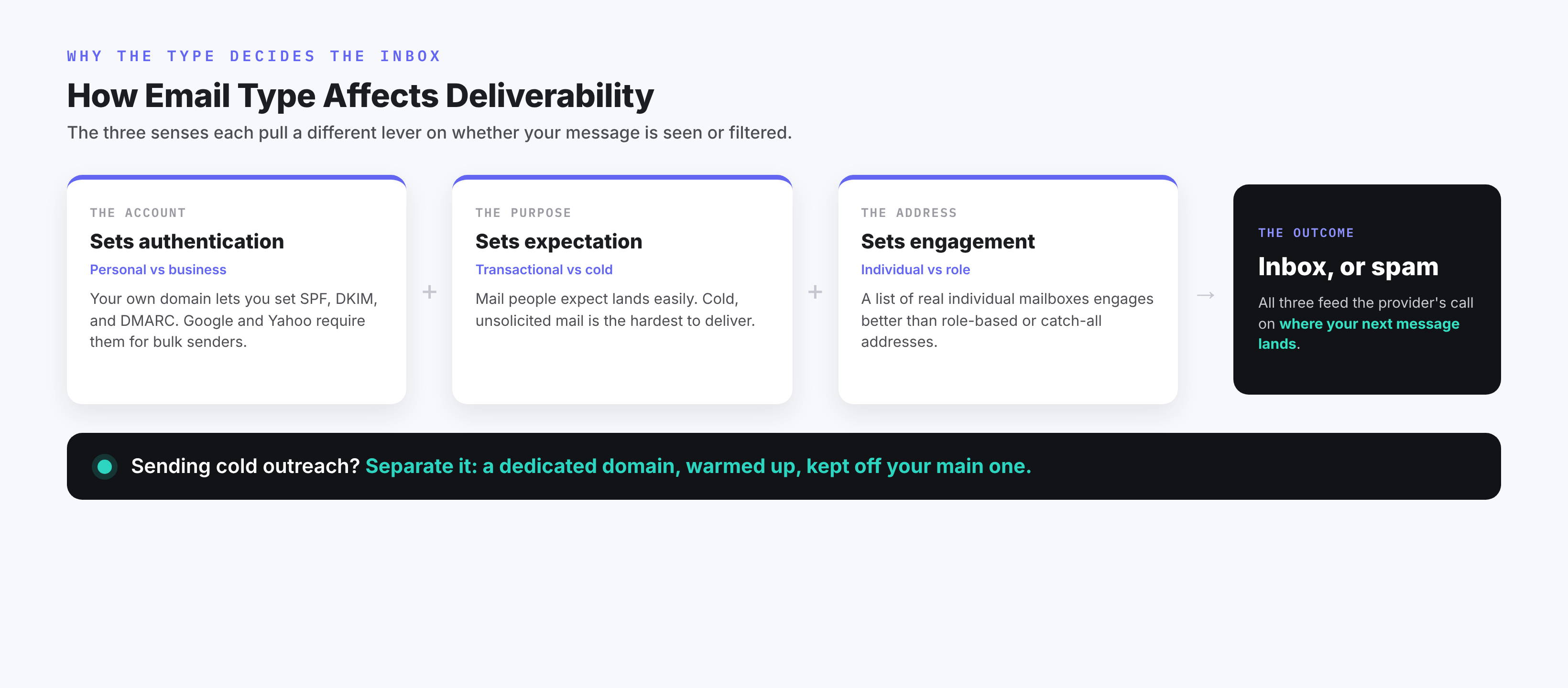
First, the account controls authentication. A business account on your own domain lets you set SPF, DKIM, and DMARC, the records that confirm a message really came from your domain's sending setup. They authenticate the domain and infrastructure rather than the human typing. Google asks every sender for at least SPF or DKIM, and since February 2024 it has required senders of more than 5,000 messages a day to personal Gmail accounts to use SPF, DKIM, and DMARC together, keep spam complaints low, and support one-click unsubscribe; Yahoo set matching rules (Google's sender guidelines). A free personal address does not let you set these records yourself, and consumer inboxes are not built for bulk sending, which is why they are a poor fit for volume email.
Second, the purpose sets the expectation. Transactional email to people expecting it tends to land reliably; cold outreach to people who did not opt in is the hardest to deliver and the easiest to get marked as spam. Sending the two from the same domain lets a problem with your outreach damage the mail your customers need.
Third, the address structure of your recipients shapes your results. A list full of role-based and catch-all addresses produces weaker, less verifiable engagement than a list of individual mailboxes, and that engagement is part of what providers use to decide where your next message lands.
If you send outreach at any real volume, a common move is to separate it from your main domain, so a problem with cold sending cannot damage the mail your customers rely on. That can mean a dedicated domain, warmed up and kept apart, or a subdomain with segmented sending; how much separation you need depends on your volume and risk, and none of it removes your compliance duties or guarantees the inbox on its own. Alore's work on cold email automation and keeping outreach organized for lead generation both start from that separation.
Frequently Asked Questions
What are the main types of email?
It depends on what you mean. By account, there are two: personal (a free address like @gmail.com) and business (an address on your own domain). By purpose, the common families are transactional, marketing, newsletter, cold outreach, internal, and notification. By address structure, the useful set is individual, role-based, catch-all, and disposable.
What is the difference between personal and business email?
A personal email uses a free, shared provider domain (@gmail.com) and is owned by the provider. A business email uses a domain you control (@yourcompany.com), usually through a paid service, giving you control over who has an address, the domain's reputation, and authentication. Personal suits individual use; business suits representing an organization.
Can I use my personal email for business?
You can, and many people start there, but it gives you less control and signals less. You cannot manage the domain's authentication, keep the mailbox if a person leaves, or present a branded address. For a team, a brand, or outbound sending, a business account on your own domain is the better fit.
What is a catch-all email address?
A catch-all is a domain setting rather than a type of address: the domain accepts mail sent to any address at it, even one that was never created. That makes verification uncertain, because a message being accepted does not prove the specific mailbox you wrote to actually exists.
What are the five categories in Gmail?
Gmail sorts incoming mail into five inbox tabs: Primary, Social, Promotions, Updates, and Forums. These organize mail you receive; they are not types of email you send, though which tab your marketing or outreach lands in affects whether it gets seen.
The One Distinction That Clears Up the Rest
If you remember one thing, make it this: a message has a purpose, an account and domain behind it, an address with its own characteristics, and a receiving system that decides what to do with it. Those are four different questions, and "types of email" blurs them into one. The purpose shapes the rules you have to follow, the account shapes how much control you hold, the address shapes how your mail performs, and the receiving provider has the final say, so none of them settles the outcome alone. Name which question you are asking, and the right types line up.