

A sales process flowchart is a map of how a deal moves from a new lead to a closed, onboarded customer, including the decision point at each stage and what happens when a deal does not pass it. That last part is what makes it a flowchart instead of a step list. A list tells you the seven stages in order; a flowchart also shows the gate at each stage (is this lead qualified? did they agree to terms?) and where a deal goes when the answer is no: disqualified, sent to a nurture track, or looped back to renegotiate. A common version maps seven stages (prospect, qualify, connect, present, propose, close, onboard), but the number matters less than drawing the gates and the no-paths honestly, because that is what tells a rep what to do next when a deal stalls.
What a Sales Process Flowchart Shows
A flowchart answers three questions a plain stage list cannot. What action happens at each stage. What has to be true to move forward (the decision gate). And where a deal goes when it fails that gate. Draw those three things and you have a working process map; leave out the gates and the no-paths and you have a diagram that looks tidy but tells no one what to do when a deal is stuck.
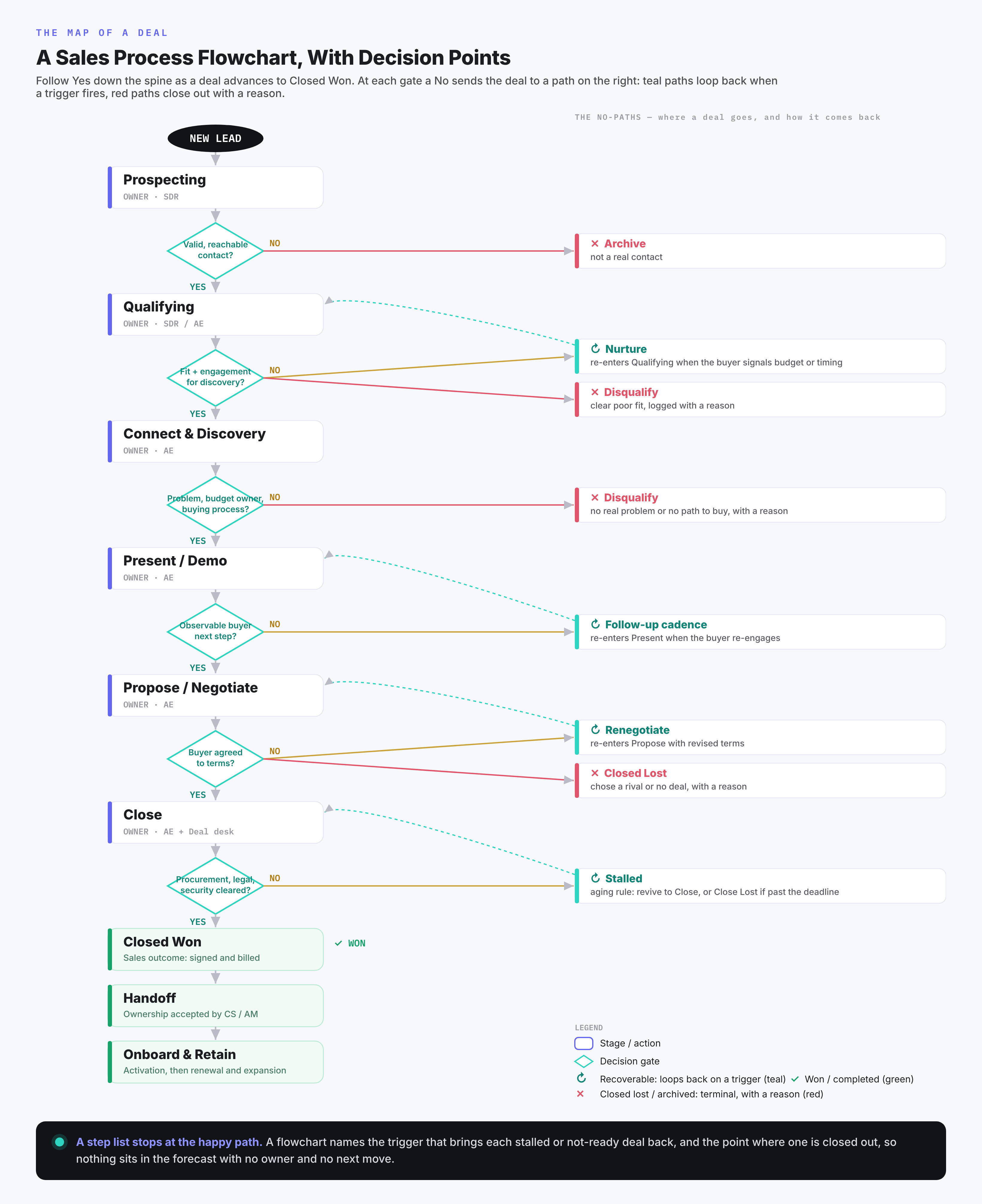
The diagram below is a detailed B2B version. Read it top to bottom for a deal that keeps advancing through the seven stages, and follow the branches to the right to see the no-paths: a lead that fails qualification drops to a nurture track, a deal that loses interest after a demo goes to a follow-up cadence, a proposal that stalls loops back to renegotiate, and a deal that goes quiet moves to a stalled lane with an aging rule.
The Seven Stages, Stage by Stage
The stages below are the common B2B shape. Rename or merge them to match how your team actually sells, but keep the gate and the no-path on each one. Who owns each stage follows from how you structure the sales team.
Prospecting. You identify and reach potential buyers through outbound outreach, inbound inquiries, referrals, or events. Gate: is there a real contact with enough information to act on? If no, archive the record. If yes, the lead moves to qualification.
Qualifying. This is a light screen rather than full discovery: do you have enough fit and engagement to justify a real conversation? Use the early signals your deals turn on, such as firmographic fit, a plausible use case, and some sign of interest. Gate: enough to justify discovery time? Split the no. A good-fit lead who is just early goes to a timed nurture track that re-enters when a readiness trigger fires; a clear poor fit is disqualified with a reason. The deeper check on budget, decision-maker, and buying process belongs in discovery, so a promising lead is not rejected merely because the final budget is not yet known. If yes, book the first real conversation. (This stage is worked out in full below.)
Connecting and discovery. You run the first call or meeting to confirm the problem, the goals, the budget owner, and how the company actually buys. Gate: a credible problem you can solve, a budget owner, and a workable buying process? If no, disqualify with a recorded reason, or return a promising-but-premature deal to nurture. If yes, schedule a demo or presentation.
Presenting or demoing. You show a tailored solution that answers what discovery uncovered. Gate: did the buyer take a next step you can observe, such as agreeing to a scoping call or looping in another stakeholder? Write exit criteria as buyer actions you can see; a rep's read of the room does not count. If no, follow up on a set cadence rather than leaving it open. If yes, prepare a proposal.
Proposing and negotiating. You send scope, pricing, and terms, then work through objections and adjustments. Gate: did the buyer agree to terms? If no, either renegotiate (loop back with a revised offer) or mark the deal lost with a reason. If yes, move to close.
Closing. The contract is signed and billing is set up. In many B2B deals this is where the most branching actually happens: the verbal yes stalls in procurement, legal redlines the contract, or a security review gates the signature. Add those as explicit gates with owners, because a deal that is "won" in the rep's mind but stuck in legal for a month is exactly the slip a flowchart exists to catch.
Onboarding and retention. This is post-sale: the opportunity is already closed won. You hand the account to customer success or account management, which has its own owner and record rather than another open opportunity stage, confirm the customer is live and getting value, and open the door to renewal and expansion. It belongs on the chart because a one-time sale becoming a repeatable one is part of the journey, even though the deal itself is done.
The Decision Points Are the Point
The value of a flowchart lives in the diamonds. At most gates a deal can go four ways, and naming all four changes how a team works a pipeline.
Advance. The deal passes the gate and moves to the next stage.
Recycle or nurture. The deal is a good fit but not ready, so it goes to a timed nurture track and comes back later. Teams that skip this path throw away good-fit leads that were only early.
Disqualify or lose. The deal is not a fit, or the buyer said no, so it exits with a recorded reason. The reason is what lets you see later whether you are losing on price, product, or timing.
Stall or go dark. The buyer stops responding with no decision either way, which a step list ignores entirely. No-decision is a large share of B2B losses: in research drawing on 2.5 million recorded sales conversations, Matthew Dixon and Ted McKenna (The JOLT Effect, 2022) found that 40 to 60 percent of deals reps expected to win ended in no decision rather than a loss to a rival, within the population they studied. Give it a path of its own, and base the aging rule on lost momentum rather than the calendar alone: no buyer engagement (a rep's own follow-ups do not count), a missed agreed next-step date, or time past the normal duration for that stage. What counts as stalled is tighter in a two-week cycle than in a long enterprise procurement. When the rule fires, run one revival play, and if it fails, close the deal lost with a reason so it stops inflating the forecast.
Define each gate with a written rule the whole team reads the same way. "Qualified" should mean a specific, checkable thing, because a gate that every rep interprets differently is not a gate. That discipline also connects the chart to your numbers, though not every milestone needs its own opportunity stage. A sales journey crosses several systems: lead or contact records early, an opportunity record once the deal is real, and a post-sale workflow after the win. The rule is that every milestone has a corresponding record, status, field, or owner somewhere, not that the flowchart and the opportunity pipeline match one to one. HubSpot, for one, keeps contact lifecycle stages separate from deal stages, and Salesforce treats opportunity stages, their probabilities, and forecast categories as separate settings. Where a gate does map to an opportunity stage, its pass rate becomes that stage's conversion rate, and the stage is what you attach a calibrated win-probability to.
A Worked Stage: Qualifying
To make this concrete, here is one stage built the way all of them should be. Take qualifying, drawn out in full.
- Entry criteria: a contact with verified details and a stated or inferred problem.
- Exit criteria, written as buyer actions you can observe: the buyer shows enough fit and engagement to justify discovery, for example by agreeing to a scoping call or confirming the problem is worth their time this period. "The rep feels good about it" is not an exit criterion. The deeper confirmation of budget, decision-maker, and buying process is discovery's exit criterion, not this one.
- Owner: an SDR or the AE, depending on your motion.
- Handoff: on exit, the SDR hands the deal to an AE with a written summary, and the AE accepts it within an agreed window. One business day is a reasonable default, but set it to your motion, since a high-intent inbound demo request may warrant minutes. The acceptance window is the SLA, and an unaccepted deal bounces back rather than sitting in limbo.
- Win-probability: a deal that clears this gate carries a win-probability in the CRM so the stage feeds the forecast rather than the rep's optimism. Set the number from your own historical win rate for deals entering this stage and revisit it as your motion changes.
- CRM enforcement: make the gate real with required fields (the fit criteria and the agreed next step), a closed-lost reason picklist, and an aging alert keyed to buyer engagement rather than elapsed time alone.
- No-paths: a good fit but early goes to nurture with a re-entry trigger; a clear poor fit is disqualified with a reason; a deal that goes quiet moves to the stalled lane under the aging rule above.
Here is that same deal followed through one full exception, so the no-paths are as concrete as the stages.
| What the buyer does | What the process does next |
|---|---|
| Completes a demo but commits to no next step | Keep in evaluation; the follow-up cadence owns the next touch |
| Asks to revisit after budget approval | Move to timed nurture with a re-entry trigger set to that date |
| Comes back with budget and asks for a proposal | Re-enter the active opportunity at Propose |
| Rejects the solution | Close lost with a verified reason |
| Goes silent past the agreed review date | Aging rule fires: one revival play, then close or defer under policy |
Each of those rules has to live somewhere in the system, or it is just a drawing. That is a configuration job, not an automatic result of the diagram.
| Process rule | How it lives in the CRM | How you check it holds |
|---|---|---|
| A deal enters Propose only after discovery exit | A stage-transition rule plus required fields on the stage | Every deal in Propose has its discovery fields filled |
| Every stalled deal has an owner and a next action | A required next-step field plus an aging alert | No deal sits past its review date without an owner |
| Every lost deal records why | A closed-lost reason picklist, required on close | Closed-lost reasons are complete, not blank |
HubSpot supports conditional required properties and stage-transition rules; Salesforce uses validation rules and stage gating. The mechanism differs by system; the discipline does not. Do this once for every stage and the flowchart stops being a drawing and becomes the operating manual for your pipeline.
How to Build Your Own
A useful flowchart comes from how your team already wins. Build it in five steps.
- List your real stages. Look at recently won, lost, and stalled deals, and the handoffs between roles, then write down the steps they went through. Won deals show the happy path; lost and stalled ones show where the no-paths really go, so studying only wins builds a chart that cannot handle a deal in trouble.
- Mark the decision gate on each stage. For each one, write the single question that decides whether a deal moves forward.
- Write the entry and exit criteria. Define what has to be true for a deal to enter a stage and what has to be true to leave it. This is the part most charts skip, and the part that makes the chart usable.
- Add the no-paths. For each gate, draw where a deal goes on a no: archive, nurture, follow-up cadence, renegotiate, or lost-with-reason.
- Give every milestone a home, and keep it to one page. Each milestone needs a record, status, field, or owner in the right system, though not every one is its own opportunity stage, and detail that no one reads belongs in the CRM rather than on the chart.
The Shapes, Briefly
Flowcharts use a small, standard set of symbols, and sticking to them makes your chart readable by anyone. An oval marks the start and end. A rectangle is an action or a stage. A diamond is a decision, with the outgoing arrows labeled yes and no. Arrows show the direction of flow. Those four are all you need, and the main flowchart above uses them.
Simple, Detailed, and by Motion
Match the level of detail to who will use the chart.
A simple five-stage version (lead, qualify, present, propose, close) is enough for a new or small team, or for onboarding a new rep who needs the shape before the detail. A detailed version adds the decision gates, the nurture and disqualify paths, owners for each stage, and the entry and exit criteria, which is what an operations lead or a CRM admin needs.
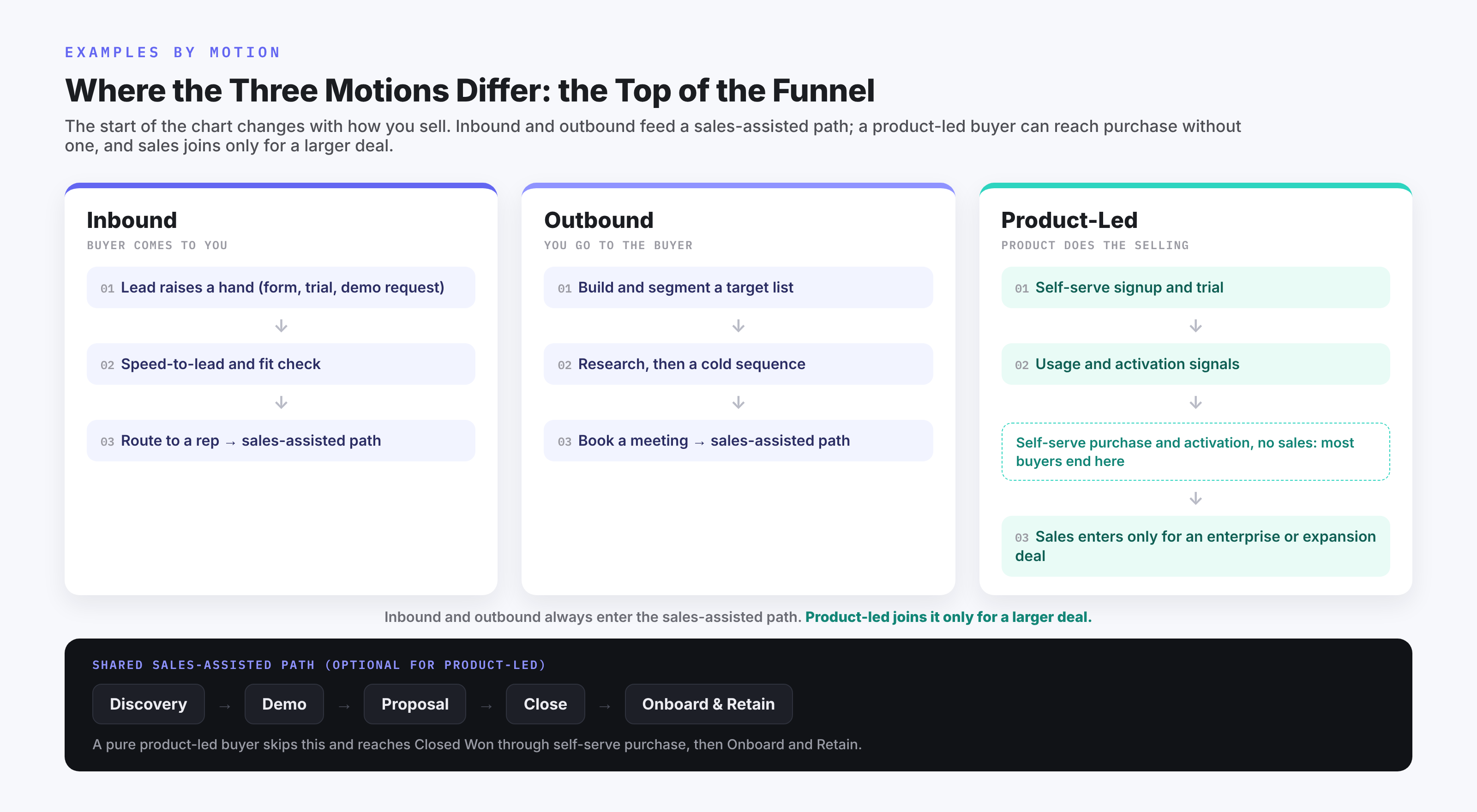
The top of the chart also changes with your motion. An inbound motion starts with a lead that already raised a hand, so the first gate is speed and fit. An outbound motion starts with a list and a cold touch, so it adds research and sequencing steps before a lead is even qualified. A self-serve or product-led motion may have a buyer move through trial and purchase with no rep until an expansion conversation, so the chart starts where sales actually enters. The stages after discovery tend to look similar across motions; the differences live at the top of the funnel. The diagram below lays the three motions side by side so you can see where each one hands off into the shared middle of the process.
Common Mistakes
A few errors show up on most first drafts.
Drawing a straight line. A chart with no decision diamonds is a step list, and it gives reps nothing to do when a deal stalls. The gates are the reason to draw it.
Copying a generic template. A template from a diagramming tool shows a generic process, seldom the one you run. Map your real won deals first, then borrow shapes.
Making it too detailed to use. A chart with forty boxes reads as an audit document that no one opens mid-deal. Keep the working version to one page and put the detail in your CRM.
Letting it drift from the CRM. If the flowchart says five stages and the pipeline has eight, reps follow neither. Keep them in sync, and update the chart when the process changes.
Skipping the no-paths. Without a nurture track and a lost-reason field, good leads get discarded and you never learn why deals die. The no-paths are where the learning is.
Flowchart, Pipeline, or Funnel?
These three get used interchangeably and mean different things. A sales process flowchart is the map of the steps and decisions a deal moves through. A sales pipeline is how those stages show up in your CRM as a list of live deals and their values, so it is the flowchart applied to real opportunities. A sales funnel is the volume view: how many leads enter and how many convert at each stage, which shows where you lose deals rather than what to do about them. You want all three: the flowchart to define the process, the pipeline to run it, and the funnel to measure it.
Frequently Asked Questions
What are the 7 steps of the sales process?
The common seven are prospecting, qualifying, connecting and discovery, presenting or demoing, proposing and negotiating, closing, and onboarding or follow-up. The exact labels and count vary by company, so treat seven as a starting shape rather than a rule, and merge or rename stages to match how your team sells.
What are the 5 steps of the sales process?
A common five-stage version is lead, qualify, present, propose, and close. It is the seven-stage process with discovery folded into qualifying and onboarding treated as post-sale. Five stages suit a shorter, more transactional deal; longer and more complex deals usually need the extra gates.
What should happen when an opportunity fails a stage gate?
It should go to a defined path, not back into a vague "still working it" state. A good-fit deal that is early goes to a timed nurture track with a re-entry trigger; a clear poor fit is disqualified with a reason; a deal that needs another step from the buyer goes to a follow-up cadence; a deal that goes quiet enters a stalled lane with an aging rule that ends in revival or a recorded loss. The point of a gate is that failing it still tells the rep exactly what to do next.
What is the difference between a sales flowchart and a sales funnel?
A flowchart maps the steps and decisions a single deal moves through, so it tells a rep what to do next. A funnel measures volume and conversion across many deals, so it tells a manager where deals are being lost. One is a process map; the other is a measurement view, and they answer different questions.
How do I make a sales process flowchart in Excel or Salesforce?
In Excel or a diagramming tool (SmartDraw, Lucidchart, Miro, Creately), use the standard shapes: ovals for start and end, rectangles for stages, and diamonds for decisions. In Salesforce or another CRM, the equivalent is configuring your opportunity stages and the entry criteria for each, so the flowchart becomes the blueprint for how you set up pipeline stages rather than a drawing that sits beside them.